

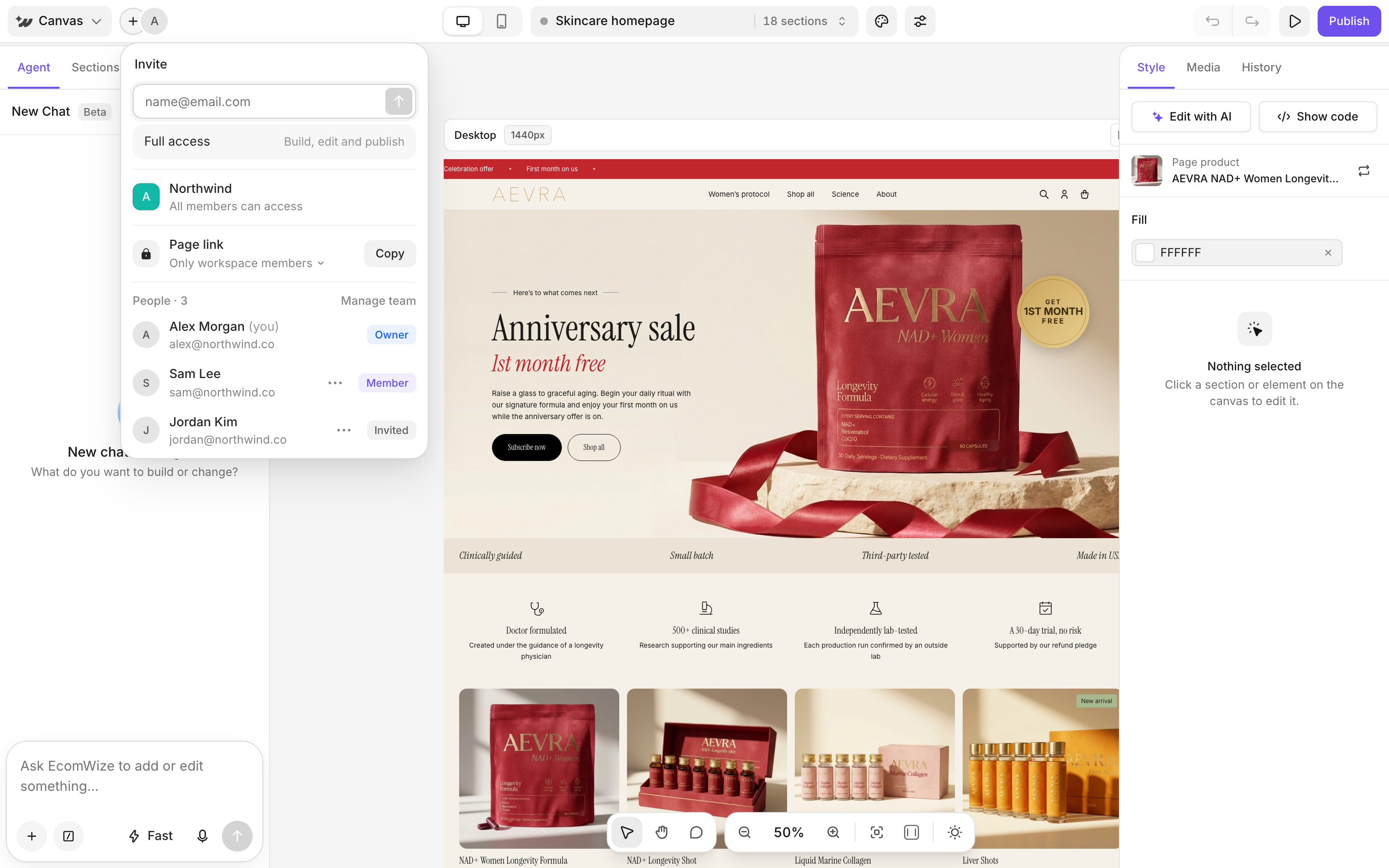
Invite a teammate from the builder
1
Open the share popover
Click the + (Invite and share) next to your avatar in the top bar.
2
Enter an email
Invite by email. Invited people get Full access: Build, edit and publish. Only the owner can invite.
3
Check the members list
The list shows who has access and who is Viewing now. Click Manage team for more options. See Workspaces.
Share a page link
Under Page link, pick who can open the link, then copy it:
When duplicating is allowed, the shared page shows Use template. People without an account sign up first, then get their own copy.
Edit together live
Teammates on the same page show as avatars in the top bar, and you see their cursors. While a teammate edits, your canvas shows their name with is editing. Click Edit anyway to make changes too. Saves sync to everyone.Leave a comment

1
Pick the comment tool
Press C or click the comment bubble in the bottom toolbar.
2
Click an element
Click the part of the page you want to comment on.
3
Write your comment
Type in Add a comment. You can attach up to 5 images (5MB each).


