> ## Documentation Index
> Fetch the complete documentation index at: https://docs.ecomwize.io/llms.txt
> Use this file to discover all available pages before exploring further.
# Page Settings
> Configure page title, URL handle, template type, store connection, product link, and advanced Shopify options.
Page Settings is a dedicated panel for configuring all properties of your page beyond section content. It covers everything from basic details like the title and URL to advanced Shopify integration options.
## Opening Page Settings
Click the **Settings** icon (gear icon) in the builder toolbar to open the Page Settings panel. The panel slides in from the right side and is organized into four sections.
## Settings Sections
The panel is divided into four navigable sections with a sticky sidebar for quick access:
### Template Type
Choose the page template type, which determines how the page is structured on Shopify:
| Type | Description |
| ----------- | ------------------------------------------------------------------------------------------------------------------------------------ |
| **Page** | A standard Shopify page. Suitable for landing pages, about pages, and general content. |
| **Product** | A Shopify product page template. Used when building custom product detail pages that replace or supplement the default product page. |
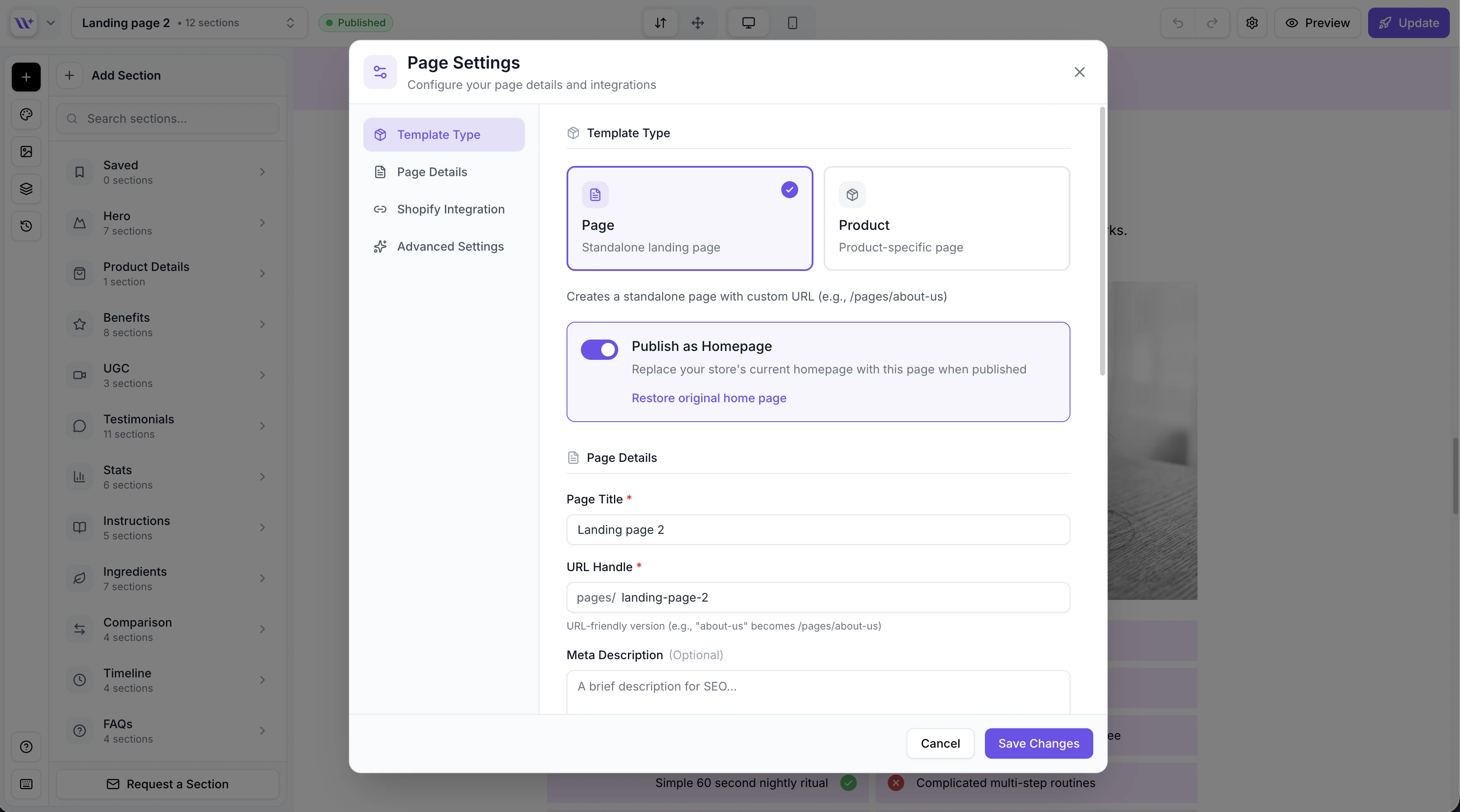 The template type affects how the page is published to Shopify. A "page" type creates a Shopify page asset, while a "product" type creates a product page template.
### Page Details
Configure the core page metadata:
* **Page title** -- The display title used in the page list, browser tab, and as the default Shopify page title. This field is required.
* **URL handle (slug)** -- The URL-friendly version of the page title, used in the page's URL path on Shopify (e.g., `yourstore.com/pages/your-handle`). This is important for SEO. The handle is auto-generated from the title but can be customized.
* **Meta description** -- A brief description of the page content for search engine results. Keep it under 160 characters for best SEO results.
Write descriptive, keyword-rich URL handles and meta descriptions. Use short handles like `summer-sale` instead of `our-amazing-summer-sale-2024-limited-time`. A good meta description improves click-through rates from Google search results.
### Shopify Integration
The template type affects how the page is published to Shopify. A "page" type creates a Shopify page asset, while a "product" type creates a product page template.
### Page Details
Configure the core page metadata:
* **Page title** -- The display title used in the page list, browser tab, and as the default Shopify page title. This field is required.
* **URL handle (slug)** -- The URL-friendly version of the page title, used in the page's URL path on Shopify (e.g., `yourstore.com/pages/your-handle`). This is important for SEO. The handle is auto-generated from the title but can be customized.
* **Meta description** -- A brief description of the page content for search engine results. Keep it under 160 characters for best SEO results.
Write descriptive, keyword-rich URL handles and meta descriptions. Use short handles like `summer-sale` instead of `our-amazing-summer-sale-2024-limited-time`. A good meta description improves click-through rates from Google search results.
### Shopify Integration
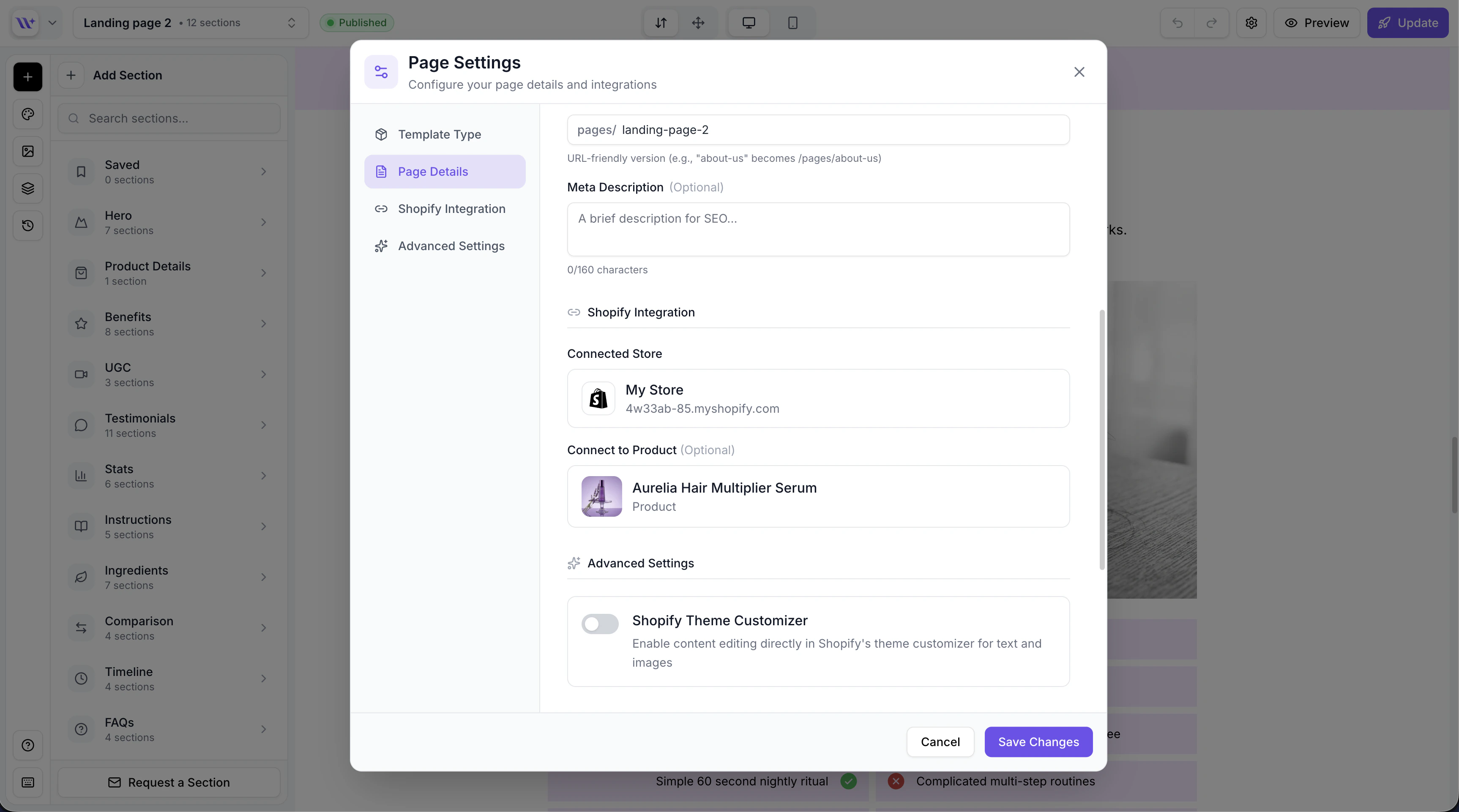 Connect your page to a Shopify store and product:
#### Store Selector
Select which Shopify store this page will be published to. The dropdown shows all connected stores with a search field for quick filtering.
* Click the store dropdown to see available stores
* Search for a specific store by name
* The selected store determines where the page will be published
* You can reassign a page to a different store at any time
#### Product Selector
For pages that showcase a specific product, link a Shopify product:
* Click the product dropdown to see products from the selected store
* Search for products by name
* When a product is selected, product-specific sections (pricing, variants, add-to-cart, selling plans) automatically pull live data from this product
The product selector only appears after you have selected a store. Products are fetched from the selected Shopify store.
### Advanced Settings
Advanced options for fine-tuning your page's behavior:
#### Publish as Homepage
Toggle this option to publish the page as your Shopify store's homepage instead of creating a new page.
Publishing as homepage replaces your store's current homepage. EcomWize creates a backup of the original homepage so it can be restored later. Use this option with caution and make sure your page is fully ready.
When homepage publishing is enabled and a backup exists, a **Restore original homepage** option becomes available, letting you revert to your store's original homepage at any time.
#### Shopify-Editable Toggle
Enable this option to allow content editing directly in the Shopify theme editor. When turned on:
* Text content can be modified in the Shopify admin without returning to EcomWize
* Changes made in Shopify persist across page loads
* Useful for teams where non-technical members need to update copy, prices, or other text content
The Shopify-editable feature is available on the **Pro** plan only. On other plans, this toggle is visible but disabled with a prompt to upgrade.
## Saving Changes
Changes in Page Settings are saved when you click the save button. A loading indicator shows while the save is in progress. The panel validates your input before saving:
* The page title cannot be empty
* The URL handle must be URL-safe (lowercase letters, numbers, and hyphens only)
* Invalid input shows inline error messages
## Settings Reference
| Setting | Location | Required | Plan Restriction |
| ------------------- | --------------------- | ---------------------------- | ---------------- |
| Template type | Template Type section | Yes (defaults to "page") | None |
| Page title | Page Details | Yes | None |
| URL handle | Page Details | Auto-generated | None |
| Meta description | Page Details | No | None |
| Store | Shopify Integration | No (required for publishing) | None |
| Product | Shopify Integration | No | None |
| Publish as homepage | Advanced Settings | No | None |
| Shopify-editable | Advanced Settings | No | Pro only |
Connect your page to a Shopify store and product:
#### Store Selector
Select which Shopify store this page will be published to. The dropdown shows all connected stores with a search field for quick filtering.
* Click the store dropdown to see available stores
* Search for a specific store by name
* The selected store determines where the page will be published
* You can reassign a page to a different store at any time
#### Product Selector
For pages that showcase a specific product, link a Shopify product:
* Click the product dropdown to see products from the selected store
* Search for products by name
* When a product is selected, product-specific sections (pricing, variants, add-to-cart, selling plans) automatically pull live data from this product
The product selector only appears after you have selected a store. Products are fetched from the selected Shopify store.
### Advanced Settings
Advanced options for fine-tuning your page's behavior:
#### Publish as Homepage
Toggle this option to publish the page as your Shopify store's homepage instead of creating a new page.
Publishing as homepage replaces your store's current homepage. EcomWize creates a backup of the original homepage so it can be restored later. Use this option with caution and make sure your page is fully ready.
When homepage publishing is enabled and a backup exists, a **Restore original homepage** option becomes available, letting you revert to your store's original homepage at any time.
#### Shopify-Editable Toggle
Enable this option to allow content editing directly in the Shopify theme editor. When turned on:
* Text content can be modified in the Shopify admin without returning to EcomWize
* Changes made in Shopify persist across page loads
* Useful for teams where non-technical members need to update copy, prices, or other text content
The Shopify-editable feature is available on the **Pro** plan only. On other plans, this toggle is visible but disabled with a prompt to upgrade.
## Saving Changes
Changes in Page Settings are saved when you click the save button. A loading indicator shows while the save is in progress. The panel validates your input before saving:
* The page title cannot be empty
* The URL handle must be URL-safe (lowercase letters, numbers, and hyphens only)
* Invalid input shows inline error messages
## Settings Reference
| Setting | Location | Required | Plan Restriction |
| ------------------- | --------------------- | ---------------------------- | ---------------- |
| Template type | Template Type section | Yes (defaults to "page") | None |
| Page title | Page Details | Yes | None |
| URL handle | Page Details | Auto-generated | None |
| Meta description | Page Details | No | None |
| Store | Shopify Integration | No (required for publishing) | None |
| Product | Shopify Integration | No | None |
| Publish as homepage | Advanced Settings | No | None |
| Shopify-editable | Advanced Settings | No | Pro only |